Calculator vault for iPhone: what it is and how CAL works
A calculator vault is an app that looks and works like a calculator, but opens a
private vault when you type a PIN and press =. CAL (our app) is a calculator vault for
iPhone that hides photos, videos, notes and files behind a calculator that really calculates.
How a calculator vault works
A calculator vault, also called a calculator lock, secret calculator or fake calculator app, puts
a working calculator in front of a hidden vault. Anyone who opens it sees an ordinary calculator,
and sums give real answers. The difference is your PIN: type it and press =, and the
vault opens instead of a result. In CAL, photos and videos in the vault are encrypted on your
iPhone, and there is no account to create.
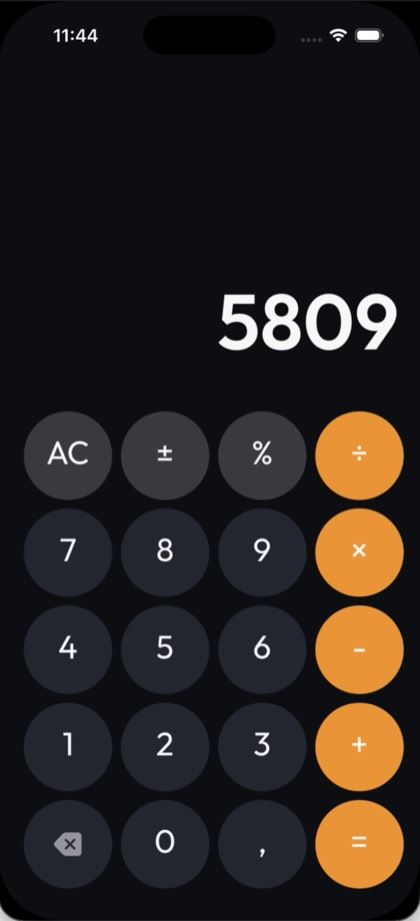
Set up CAL as a calculator vault
The calculator disguise is off when you first install CAL; until you turn it on, CAL opens on a passcode screen. To turn it on:
- Install CAL from the App Store, open it and go through the welcome screens.
- Create a 4-digit PIN, then save the Recovery Code that CAL shows you. Keep the code somewhere safe and separate from your iPhone.
- In CAL, tap the round profile picture at the top of the screen to open Profile.
- Go to Advanced Protection → Facedown Lock, choose Calculator and tap Apply. This also turns on Facedown Lock, which closes the vault when you put the phone face down. Before you do this, make sure you know your PIN: the Recovery Code is entered on CAL's passcode screen, and while the disguise is on, CAL opens on the calculator instead.
- Leave CAL. The next time you open it, you see a calculator: type your PIN and press
=to open the vault.
What you can keep in it
You can hide photos, videos, notes, passwords, contacts and files of any kind. Import photos and videos from your library, or take new ones with CAL's own camera so they go straight into the vault and never into your camera roll. Sort files into private folders. To hide photos you import, also delete the originals from the Photos app; see how to hide photos on iPhone.
Change the home-screen icon
The calculator disguise changes what CAL shows when it opens; the icon on your Home Screen is a separate setting. In CAL, go to Profile → Advanced Protection → Change App Icon and choose the Calculator icon, or another one such as Calendar, Clock, Weather or Notes. Changing the icon is free.
FAQ
Does a calculator vault still work as a calculator?
Yes. CAL's calculator adds, subtracts, multiplies and divides, and handles percentages, ± and decimals. Only your PIN followed by = opens the vault; sums give their answer as usual.
Can someone tell it's a vault?
Not from the calculator: nothing on that screen points to a vault, and sums give real answers. CAL is still an app on your iPhone, though, and the name under its icon stays CAL, so it hides your files rather than the app itself. For extra cover, set up a Decoy Vault.
Forgot your CAL PIN?
Use the Recovery Code you saved when you set up CAL. It resets the PIN on your iPhone, with no email or internet needed, and your files are kept. The code is entered on CAL's passcode screen, but while the calculator disguise is on, CAL opens on the calculator instead, so make sure you know your PIN before you turn the disguise on. The steps are on our Support page.
Is it free?
Yes, CAL is free to download. No ads. The calculator disguise, Decoy Vault, Facedown Lock, the Panic shake and disguise icons are all free, and the free plan has storage limits. Pro removes the limits and adds the browser's ad blocker and encrypted iCloud Backup & Sync. You can buy Pro once as a Lifetime purchase, or subscribe monthly or yearly.